Related Topics
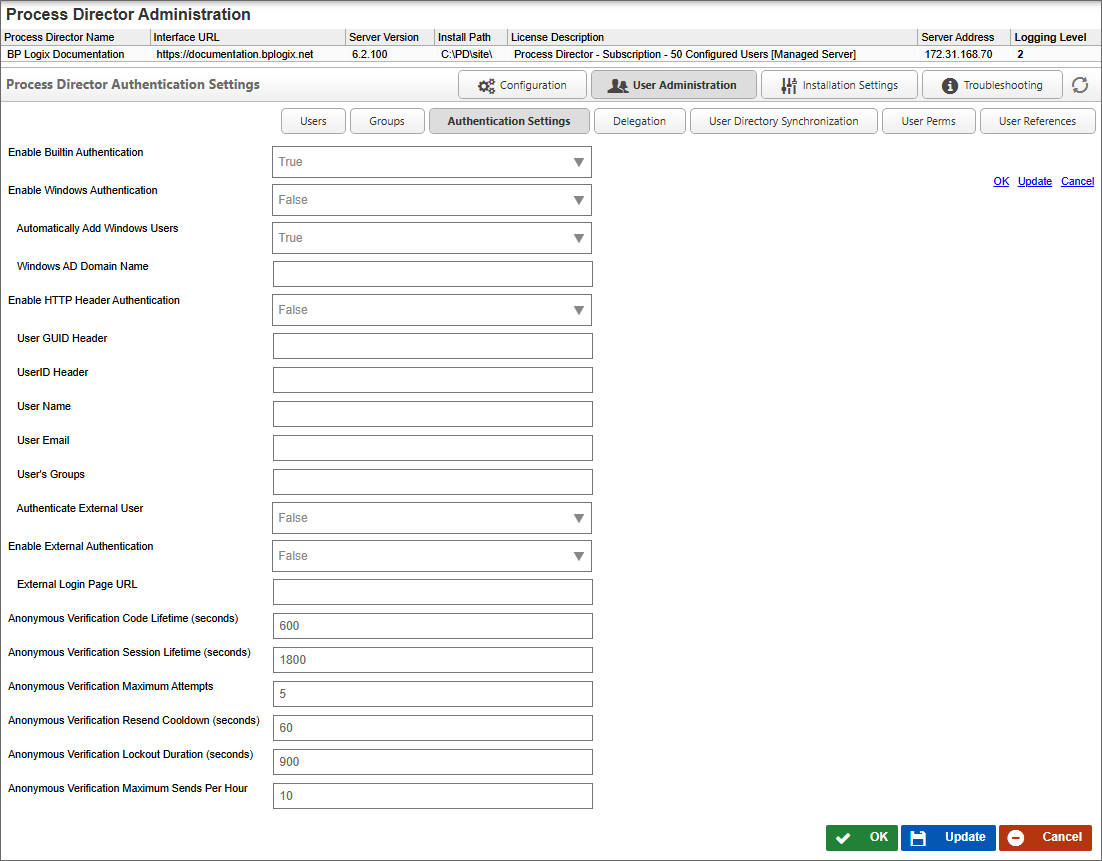
The Authentication Settings page enables you to determine the authentication methods available to users. As a default, Built-In authentication is automatically enabled. Other Authentication settings can be configured so that NTLM, Single-Sign-On, etc., are enabled.
 Enable Built-In Authentication
This is the standard Process Director option, and is set to true by default.
Enable Windows Authentication
When set to true, this setting enables Windows authentication, so that Single Sign-On is used to authenticate users via their Windows identity.
Automatically Add Windows Users
When set to true, new Windows users will be automatically added to Process Director.
Windows AD Domain Name
The Active Directory domain name for the domain from which to add windows users to process Director.
Enable HTTP Header Authentication
When set to true, this setting enables authentication through the HTTP header, enabling users to log in via NTLM through an identity that is set in the HTTP header of the page request when a user navigates to Process Director with their browser. All users log in with a single identity specified in the header settings.
User GUID Header
The value of the User GUID to use in the HTTP Header.
UserID Header
The value of the UserID to use in the HTTP Header.
User Name
The value of the User Name to use in the HTTP Header.
User Email
The value of the User email address to use in the HTTP Header.
User's Groups
A comma-separated list of Groups to which the User should be assigned to use in the HTTP Header.
Authenticate External User
This setting determines whether external users, i.e., users that aren't listed in the User database, should be authenticated.
Enable External Authentication
This setting, when set to true, enables you to use a login page outside of Process Director.
External Login Page URL
The URL of the external login page.
Anonymous User OTP Settings #
Process Director v6.1`.200 and higher implements a feature that enables you to send a One-Time Password (OTP) to authenticate anonymous users when they're assigned a task. On the implementation side, a new property on the Advanced Options tab of a user activity, Require anonymous users to verify their email address with a one-time code, turns on the OTP authentication for a user activity task assignment to an anonymous user. Several new settings have been added to this page to govern the operation of OTPs sent to anonymous users.
Anonymous Verification Code Lifetime (seconds)
This property specifies the number of seconds that the OTP will remain valid before expiring. The default value is 600.
Anonymous Verification Session Lifetime (seconds)
This property specifies the number of seconds an anonymous browser session remains valid before the user must verify again. The default value is 1800.
Anonymous Verification Maximum Attempts
This property specifies the maximum number of incorrect validation attempts before the verification challenge is locked. The default value is 5.
Anonymous Verification Resend Cooldown (seconds)
This property specifies the minimum number of seconds that must elapse before sending an additional verification code email. The default value is 60.
Anonymous Verification Lockout Duration (seconds)
This property specifies the number of seconds the verification challenge remains locked after too many failed verification attempts. The default value is 900.
Anonymous Verification Maximum Sends Per Hour
This property specifies the maximum number of times per hour a verification code can be sent to the same email/IP address. The default value is 10.
Authentication Types
Users must access Process Director with a User ID and password. A User ID must exist in the Process Director database before a login can occur. Process Director supports four types of user authentication methods.
Windows Domain Security
This authentication mechanism uses your Microsoft Windows Domain to authenticate users. These users will be automatically added to the Process Director database after being successfully authenticated by your Windows Domain Server.
LDAP
This authentication mechanism uses your LDAP server (e.g. Active Directory) to authenticate users. These users will be automatically added to the Process Director database after being successfully authenticated.
External
External users are those that are authenticated by a third party system. This includes products such as CA CleverPath Portal, CA Siteminder, Cafesoft Cams, and other external authentication systems using Process Director APIs. External users are automatically kept synchronized with the third party authentication system on every login.
More information about setting up authentication settings can be found in the User Authentication Options and SAML 2.0 (Federated Identity) Support sections of the Installation Guide.
Continue
Continue to the documentation for the Delegation page.
Documentation Feedback and Questions
If you notice some way that this document can be improved, we're happy to hear your suggestions. Similarly, if you can't find an answer you're looking for, ask it via feedback. Simply click on the button below to provide us with your feedback or ask a question. Please remember, though, that not every issue can be addressed through documentation. So, if you have a specific technical issue with Process Director, please open a support ticket.